
arbor is a small, LLM-friendly meta-modeling language for software models. You define the kinds of things in your domain in a profile, write models of them in one generic syntax, and edit those models as text or as diagrams, in VS Code or in the browser.
 .arbor text ──► Langium AST ──► IR (JSON) ──► diagram (WebGPU)
 (profiles +                        ──► JSON Schema / OpenAPI / DDL …   (planned)
  models)
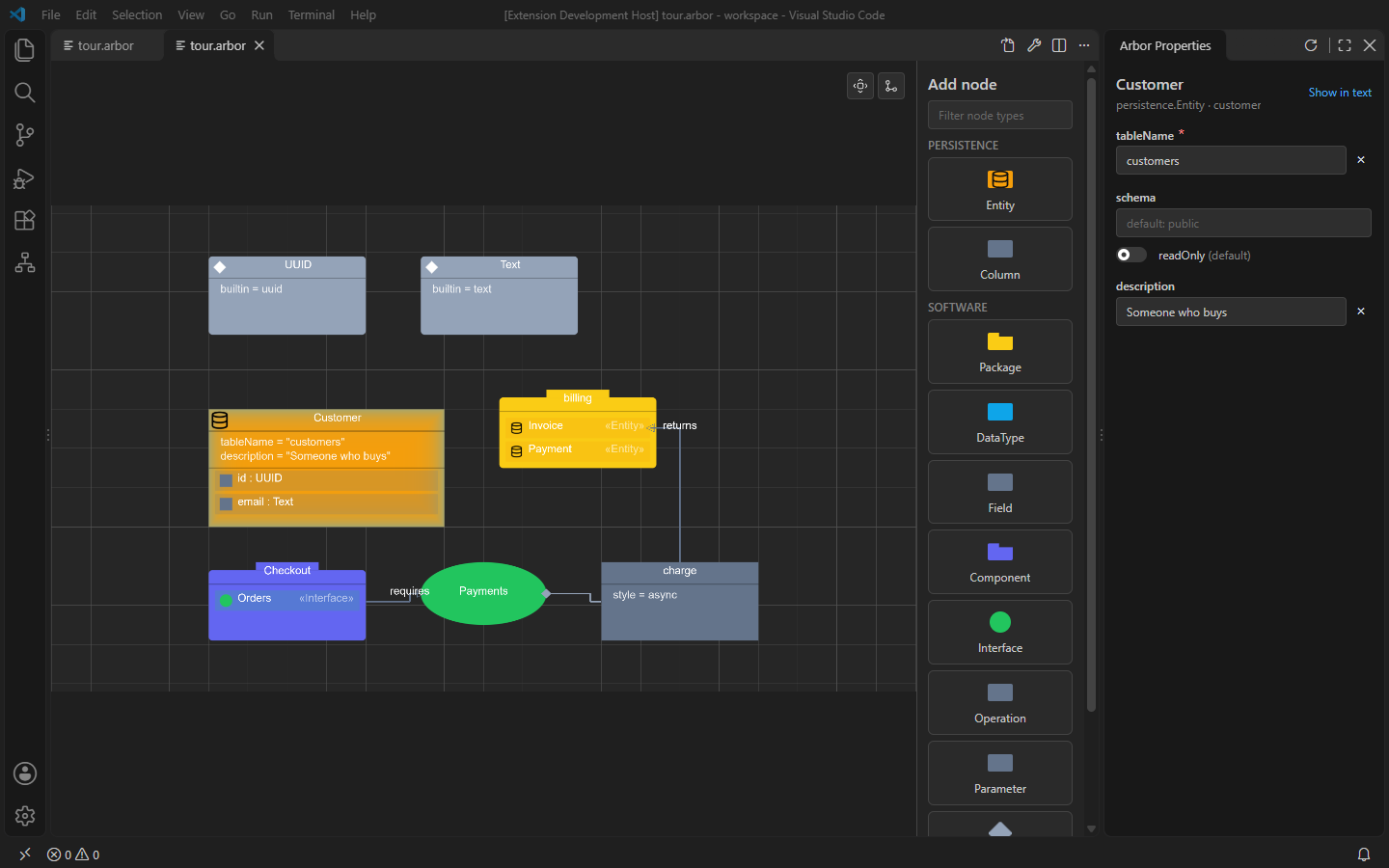
Contents
- What arbor is
- Getting started
- The language (full reference)
- Editing in VS Code (full guide)
- Editing in the browser
- How it fits together
What arbor is
| Layer | In arbor | Example |
|---|---|---|
| M3, the meta-language | the grammar: kind, prop, contains, ref, enum, visual |
fixed |
| M2, your domain | profiles: kinds, their features, how they’re drawn | software.arbor, persistence.arbor |
| M1, your system | models: instances of those kinds | tour.arbor, shop.arbor |
- A new domain is a new profile, never a grammar change. Profiles are
data, loaded at runtime: no code generation and no
eval. - Text is the source of truth. Diagrams edit the text; where things sit on a diagram lives in a separate view file, so the model stays clean.
- Built for LLMs too. The syntax is small and uniform, every diagnostic has a stable code (and often a fix), and the language reference is short enough to paste into a prompt.
Getting started
You need Node 20 or later and, for diagrams, a WebGPU-capable browser or
VS Code. Diagrams use the webgpu-flow
renderer, checked out at webgpu-flow/.
git clone --recurse-submodules https://github.com/javapak/arbor
cd arbor
npm install
npm test                             # generate the parser, build, run the tests
npm run check -- examples/*.arbor    # diagnostics, one JSON object per line
npm run ir    -- examples/*.arbor    # the IR
Then pick an editor:
- VS Code:
npm run extension, then F5 with the Arbor extension launch configuration. See Editing in VS Code. - Browser:
npm run studio, then open http://localhost:5173. See Editing in the browser.
The language
A profile defines kinds; a model is a tree of elements of those kinds:
profile persistence version "0.1.0" {
    kind Entity extends software.DataType {
        prop tableName: string [1]
        contains fields: Column [0..*]
        visual { shape: "rectangle" color: "#f59e0b" }
    }
}

model tour {
    Entity Customer @"customer" {
        tableName: "customers"
        Column id { type: -> UUID  unique: true }
    }
}
prop holds values, contains nests elements, ref points at other
elements (-> UUID), and visual says how a kind is drawn, including
whether it draws its contents inside itself (container: true) or is drawn
inside its owner (member: true).
Read the language reference for profiles, models, qualified names, stable IDs and every diagnostic.
Editing in VS Code
The extension gives .arbor files a language server (diagnostics,
completion, go to definition) and a diagram editor on the same file.
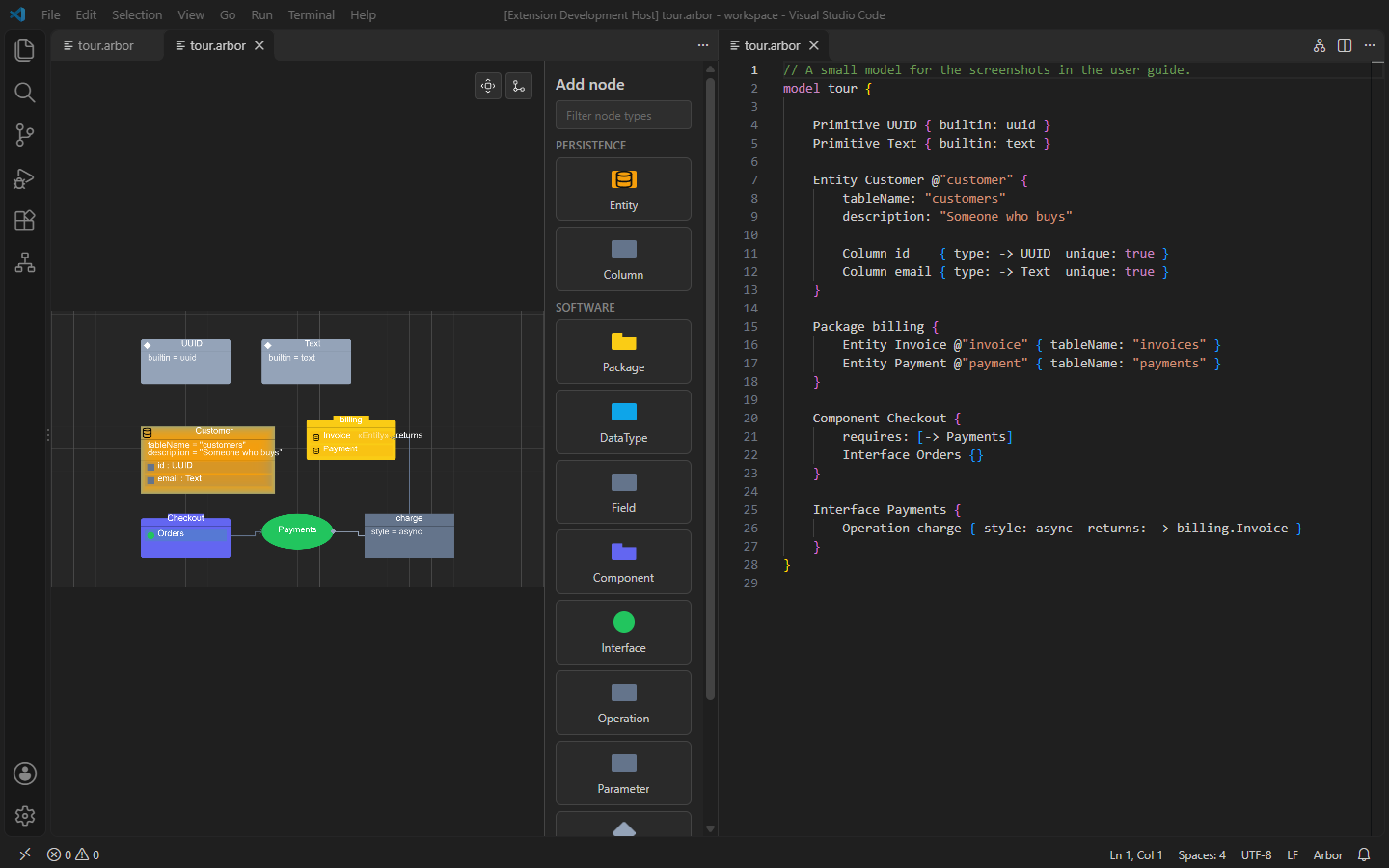
- Diagram and text stay in step. Adding or deleting a node edits the text; moving, resizing and bending edges only change the view file.
- Boxes like UML classes. Properties are listed under a node’s name,
attributes such as an Entity’s columns are rows inside it (
id : UUID), and containers such as packages draw their contents inside themselves. - Automatic layout with edges routed around nodes, grid snapping, and edge hops where lines cross.
- A Properties view in the side bar to edit the selected element.
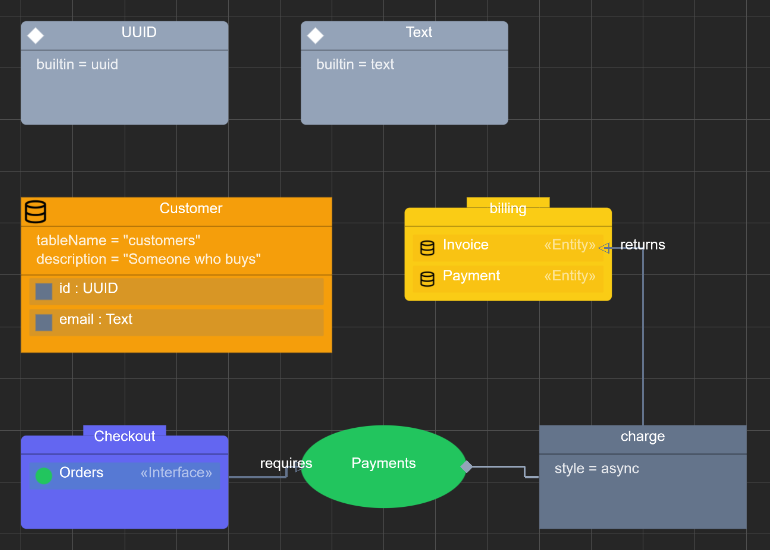
Read the VS Code guide for all of it, with screenshots.
Editing in the browser
The studio (apps/studio) puts a text editor and the diagram side by side in
the browser, with the same diagram, palette and layout toolbar as VS Code.
Every text change redraws the diagram; adding or deleting a node edits the
text. Files and layout are kept in the browser’s local storage, and Reset
to examples starts over.
npm run studio # http://localhost:5173
How it fits together
Nothing converts directly to anything else: importers produce the IR, and everything downstream reads it.
| Package | Purpose |
|---|---|
@arbor/ir |
the IR’s types and JSON Schema, read helpers (inheritance, defaults, visuals) |
@arbor/language |
the grammar, validator, AST → IR, CLI and language server |
@arbor/adapter-flow |
IR → diagram nodes and edges, with layout from the view file |
@arbor/property-form |
the form for one element’s slots, from its kind’s schema |
apps/vscode |
the VS Code extension |
apps/studio |
the browser studio |
More detail, and the design decisions so far, are in the README.